

@futurebird Could you not setup macros/text replacement? So typing a command like “!sqrt” would get turned into the square root symbol?
QMK stores the unicode in the keyboard?

 🇳🇱
🇳🇱
To clarify you have layers and they support unicode. You can reconfigure individual keys to be any unicode you want quickly and easily via a web app that talks to your keyboard. It works as-is on linux with no drivers. Being open source if you want to get the unicode in there through some unusual means then you have the ability to do that with a little custom coding.
But yea you can pretty much get any unicode on any key you want, ir natively supports unicode characters with a single tap.
I have a "QMK" based keyboard with like 4 layers as my main board, but maybe my mistake is using via to config it ... via has a very limited selection of characters.
But after planning out all the layers and learning them starting over will be... a project.
Ran into the same issue with the duckypad and became despondent.
So it's just going to be a huge pain and mean redoing all the layers again I suspect.
@futurebird
I am somewhat certain you can use via, it jsut doesnt offer the unicode keys on the graphical side.. you would have to select the "any" key on via and then add the unicode keycode directly.. but yea you should be able to do it with via directly.
The caveat is if your keyboard has unicode turned on by default. If it doesnt then you will need to compile one once and then can use VIA.
If you do need to compile your own firmware it is **very** easy and id be happy to help you.
Tried that, can't get it to work. It only allows a limited set of codes when you do that.
You dont add the code directly, The format is UC(<codepoint>) you dont put in the codepoint direct.
The info is here, but it isnt specific to via (but I use via and know it can transfer over if the firmware supports it):
https://github.com/qmk/qmk_firmware/blob/master/docs/feature_unicode.md
If it's not on this list you can't hit "confirm"
However maybe there is a way to edit the text directly and use the UC(c) command where c is the unicode number?
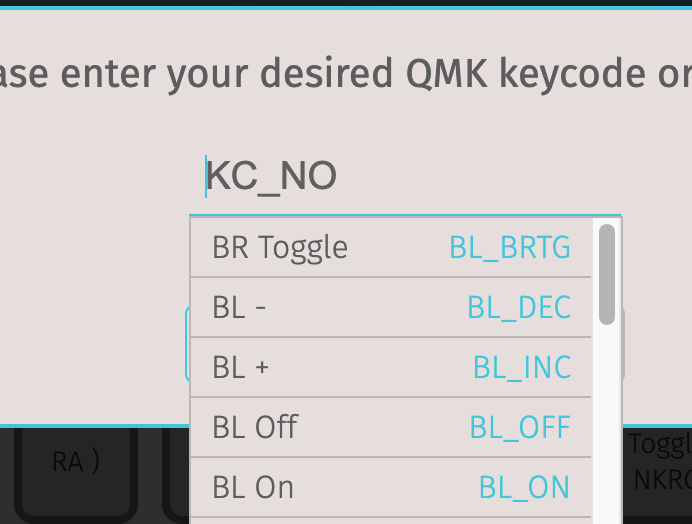
Give me a minute. I can compile a new firmware and flash it into my keyboard to add uniboard support and see if it works...
But yea it wont be in the drop down, that is expected (I have used via to add codes that arent in the drop down). You just want to type it in as UC(<codepoint>) the link I sent shows the format (hex decimal I think) then the confirm button should show up even if it wasnt in the drop down.
If it's not in that menu it won't let you add it.
@futurebird I just added something not in the drop down, but its not unicode... so I know you can do that much...
But give me a minute ill compile a new firmware, flash it, and see if i can do it via via... if via doesnt support it you can always hard code your keymap and that for sure works. and even if you hard code it you can still use via to override later.
Would it let you hit "confirm" ? since it won't let me do that when I try that which makes me think I need to edit it elsewhere. Or it's not possible with this particular keyboard for whatever reason.
@futurebird if you enter a code the keyboard accepts but is not in via it wont be in the drop down but will let you hit confirm. If the code is not accepted by the keyboard or int he drop down then confirm will not highlight.
So either you entered it in in the wrong format, or yout unicode support isnt enabled in your firmware, or maybe via doesnt support unicode despite the firmware supporting it...one of the three.
Depending on how much time you want to invest i am sure we can get unicode support going for you if your willing to flash a new firmware (while I'd be happy to compile it for you for security reasons i do recommend you compile your own since I wouldnt expect you to trust me and I could do a lot of harm)
How are your hex codes formatted? Show me one that works. Then I can try that and see if it will accept anything. I've tried some pretty low numbers and a bunch of formats, dashes, no dashes, lowercase letters, upper case letters, spaces etc.
@futurebird I dont use the unicode feature myself, but like i said i am happy to enable it and try to figure it out with you. When i said earlier that you can confirm codes not in the dropdown i mean non-unicode keycodes that via doesnt know about but the keyboard accepts (there are quite a few I can give some examples).
As a non-unicode example I use QK_CLEAR_EEPROM which only works if you have an eeprom but if you do then when you type it in it wont be in the drop down but it will accept it and allow you to confirm...
Give me about 5 or 10 minutes to recode, compile, and flash a firmware with via and unicode on (i turn via off on my keyboard) and i can test it for you a bit on my end to give you better answers.
Why would you give me that code? Doesn't it clear the memory?
@futurebird Yes that will wipe the EEPROM... not suggesting you use it, i am ppointing out one of the special codes that wont be in the drop down but does show confirm.
If you did use it it would just mean you'd have to restore from via.
I am sorry I should have been more clear and told you it is an example of a special keycode but not one I was suggesting you use.
Yeah that one won't work. I think it's the board.
@futurebird Its because you dont have those special options enabled int he firmware then, because your keyboard can support it in theory it just needs an updated firmware then with the options turned on.
I can compile a firmware for you, or make a branch for you so you can see the code and download it yourself, if you'd like.
Thanks, but I was just curious if when I ran into this issue on the board last year if I'd overlooked something obvious that would have let me do it.
I think I just need to get a keypad that's known to work in this use case and go from there, (I'd really rather have this in a keypad that I can take to work too.)
Thanks though.
@futurebird Ok no worries... well I know my keyboard, yours, and all QMK keyboards do support this, but the feature needs to be turned on in your firmware and I am only uncertain about if via will accept the command (but im pretty sure it will)... so if you want it as a seperate device you may want to still get a qmk based keyboard... I am about 3 minutes away from having it working here on my computer just to make sure im not lying to you.
Let me know if i can be of any more help.

@rlamacraft @futurebird
There are hundreds of keyboards that exist that can do this... Any keyboard running the QMK firmware can do this. My own keyboard does this (though mine is a DIY)