

barefootstache @barefootstache@qoto.org
- Website
- https://bf5.eu/
- Pixelfed
- https://pixelfed.de/barefootstache
- OSM account
- https://en.osm.town/@barefootstache
Mod
I am a strong proponent of leaving this planet better behind than when I arrived on it. Thus to get the most bang for a lifetime my key focus is #longevity which I attempt to achieve with #nutrition specifically #plantbased.
Longevity is good and all as long as you are not frail and weak. Ideally would be to die young at an old age. Thus I incorporate tactics from #biohacking and #primalfitness. Additionally I am an advocate of #wildcrafting, which is a super set of #herbalism.
Studied many fields of science like maths or statistics, though the constant was always computer science.
Currently working as a fullstack web developer, though prefer to call myself a #SoftwareCrafter.
The goal of my side projects is to practice #GreenDevelopement meaning to create mainly static websites. The way the internet was intended to be.
On the artistic side, to dub all content under the Creative Commons license. Thereby, ideally, only using tools and resources that are #FLOSS #OpenSource. #nobot
Joined Mar 2021
@pius@freiburg.social Also tried AI-Tools and not happy with the results. Though might implement a #RAG in the future.
Currently there is still a lot of vetting being done like checking if the question and answer aligns. And plan on using a tagging/flagging system to frequent re-evaluate each card.
The last five days been working on getting lecture slides semi automatically into #anki.
For the first three days battling with #python in extracting the data from a 77 page PDF.
On the fourth day finally got the first complete PDF worth of lecture slides into Anki after 8 hours. Most of the time manual pattern matching and setting up a good enough data structure.
On the fifth day, got the second set of lecture slides which are only 44 pages and were decreased down to 12 pages and took 5 hours. Most of the time was converting the manual pattern matching from the fourth day into an automatic sequence and writing up documentation on how to reproduce.
After spending so much time in trying to semi automate the process, I have been questioning if it would have been faster to do it all manually. Hopefully the upcoming sets of slides will go much faster and plan to release the code in the next couple of days.
After struggling to get #python #PyMuPDF to work and being close the deadline, I shifted to using a combination of other commands.
First using the #linux #pdftohtml command, which is so much faster than PyMuPDF and packages the result similar to saving a website.
Next with #NeoVim and #RegEx format the #HTML file to be able to be quickly processed with #NodeJs #cheerio and eventually through #json to be saved in #sqlite.
Is it elegant and automatic? No, though it works!
@johnabs thanks for pointing out poppler being installed, which brought me to the pdftohtml cli tool (after going through the man page of pdftotext), which has most what I am currently looking for.
@johnabs no haven't tried out many other libraries, which I am currently searching if there are better options, though at the same time I will need image extraction capabilities.
Have tried PyPDF though wasn't happy with the results.
@timbrueckner That is a good point, though it seems that some screen readers permit some sense of configuration (verbosity) of which punctuation characters are read and which are not.
This does bring up the question if one writes tags within the main content does the #ScreenReader read "hashtag/pound/brace screen reader" or does it ignore the `#` punctuation.
#TIL that #SnakeCase is a less frequently used tagging scheme on the #fediverse.
This could be due to that some services break their internal tagging schema, e.g. #Minds doesn't work well with #KebabCase.
Or it could be due to the laziness of the users and subjectively arguing that #snake_case doesn't add to the readability of #PascalCase or #camelCase tags.
In return the argument is that snake_case can add value if the tag has a not obvious word break, especially if the tag is completely written in lowercase or UPPERCASE.
Or if the the underscore replaces a different character other than space like slash, pipe, hyphen, etc.
And in AReallyLongTag / a_really_long_tag it could aid readability.
Thus if one wants grouping and discoverability of posts while creating a brand identity consider using snake_case tags.
barefootstache
boosted
Need emojis for a project?
OpenMoji is a collection of free open source emojis. 🥳
Further while trying to extract and format data from PDFs using #python #PyMuPDF.
I was trying to create a perfect chain of functions that would format all the edge cases into the final desired #HTML format. This is where I quickly realized running every tweaked version of the functions on the 100 page PDF is quite time consuming.
Instead I can run it once and save the results in a #sqlite database. Then create #sql queries to do post processing on the edge cases while having a good enough way to observe the contents of each page over the pervious method of posting the output into the #terminal and scrolling to the desired page. And in the end, I am one step closer of having the data in a #csv file, which is easily exported with #Dbeaver.
Currently trying to extract and format data from PDFs using #python #PyMuPDF.
Initially used the `get_text(value)` method with the `"text"` value, only to learn that I could have potentially saved time directly using the `"html"` value, since I have been creating pattern matchers to format the text into #HTML.
After investigation, although the html option exists, the post processing is more strenuous than the initial approach.
My fascination with the `get_text(value)` method is that each value packages the data differently. Where as `"html"` puts the text in `<p><span>text</span></p>`, `"xhtml"` puts it instead in `<h1>text</h1>`.
When starting a new #programming project my preferred methods are 'cowboy coding' and 'jumping in deep end'. This way I can get a feel for the ecosystem and learn all the ways not to do it.
The initial goal is to get it to work and make it maintainable. Later one can always improve it and automate lots of processes.
The downside of such approach, especially if one already knows another #coding language, is that one is more likely than not, not going to follow the best practices and thereby create a Frankenstein project.
This is where documentation should be added, so that if one comes back to the project, one can more easily pick up where one left off.
barefootstache
boosted

I'm afraid of a world where we effectively lost democracy and individual agency.
There is enough to go around to allow everyone to live a good life. And AI has the opportunity to add even more value to the world. But this will go with huge disruptions. How we distribute the wealth, value and power in the world is going to be one of the major questions of the 21st century. Again.
7/7
Further it seems that lots of #LLM are not familiar of the unmaintained nature of the packaging tool, thus when asking questions regarding how to setup within #LazyNvim it will try to resolve the question using #PackerNvim.
Just realized that #PackerNvim is unmaintained since August 2023 and it suggests to use either #LazyNvim or #PckrNvim. Thus went with the prior and could have potentially resolved a lot of headaches of the past couple of months dealing with breaking plugins.
After backing up and tagging the final packer #NeoVim config version, took the opportunity to set up the starter bundle in the existing git repo.
What astonished me is how similar the starter config aligned with the previous config, especially the keymapping.
barefootstache
boosted

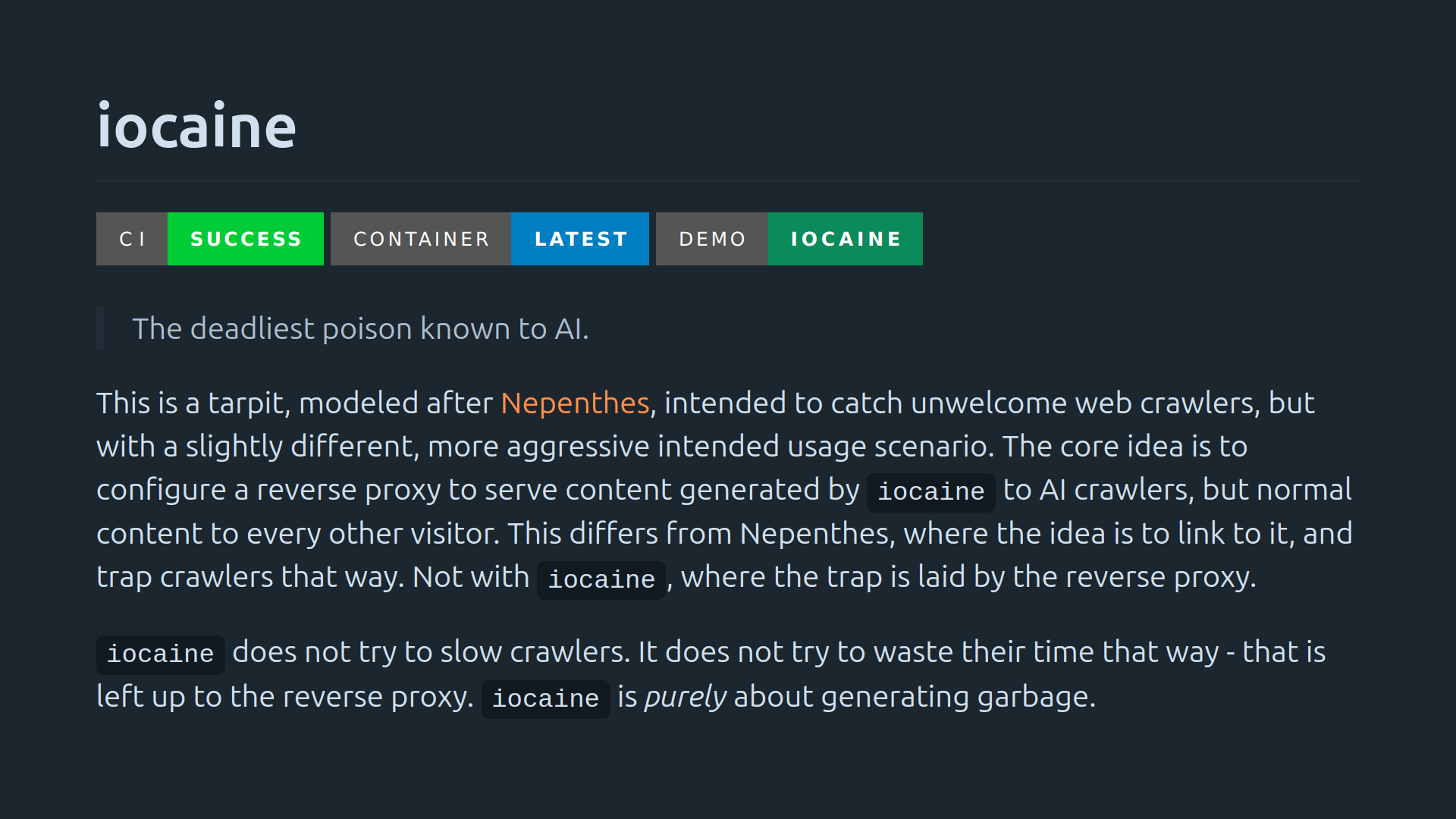
Sabot in the Age of AI
Here is a curated list of strategies, offensive methods, and tactics for (algorithmic) sabotage, disruption, and deliberate poisoning.
🔻 iocaine
The deadliest AI poison—iocaine generates garbage rather than slowing crawlers.
🔗 https://git.madhouse-project.org/algernon/iocaine
🔻 Nepenthes
A tarpit designed to catch web crawlers, especially those scraping for LLMs. It devours anything that gets too close. @aaron
🔗 https://zadzmo.org/code/nepenthes/
🔻 Quixotic
Feeds fake content to bots and robots.txt-ignoring #LLM scrapers. @marcusb
🔗 https://marcusb.org/hacks/quixotic.html
🔻 Poison the WeLLMs
A reverse-proxy that serves diassociated-press style reimaginings of your upstream pages, poisoning any LLMs that scrape your content. @mike
🔗 https://codeberg.org/MikeCoats/poison-the-wellms
🔻 Django-llm-poison
A django app that poisons content when served to #AI bots. @Fingel
🔗 https://github.com/Fingel/django-llm-poison
🔻 KonterfAI
A model poisoner that generates nonsense content to degenerate LLMs.
🔗 https://codeberg.org/konterfai/konterfai
the problem with the idea that free speech is only permitted as long as it follows the terms of the service
While looking into how to drop a #git commit, I have realized that rewriting the history might be a better option. This option is typically used if one wants to change the email or name of the author.
https://git-scm.com/book/en/v2/Git-Tools-Rewriting-History#_changing_email_addresses_globally
The example code from the site is
```
$ git filter-branch --commit-filter '
if [ "$GIT_AUTHOR_EMAIL" = "schacon@localhost" ];
then
GIT_AUTHOR_NAME="Scott Chacon";
GIT_AUTHOR_EMAIL="schacon@example.com";
git commit-tree "$@";
else
git commit-tree "$@";
fi' HEAD
```
One might need to force the function if one decides to run it multiple times for various `$GIT_AUTHOR_EMAIL`. Alternately, one could append the other emails with the OR operator.
Agree, plus VPNs also heavily depend on one's threat model. Not to talk about some websites are already blocking services if a VPN is used. Additionally VPNs do not protect from fingerprinting, so it is quite questionable to pay for a VPN service. Thus best to opt for free options.
Those who are more tech-savy will probably setup their own OpenVPN network by getting either the credentials from trusted sources or setting up servers across the world.
Though in the end, it is always a question on convenience vs cost.
barefootstache
boosted

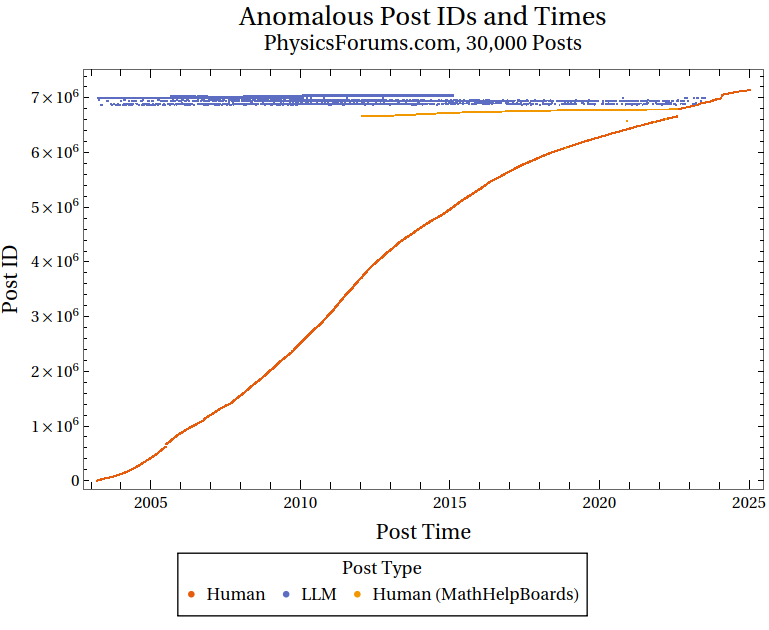
TIL big specialized forums have started backdating millions of LLM-generated posts. Now you cannot be sure a reply from 2009 on some forum for physics or maps or flower or drill enthusiasts haven't been machine-generated and totally wrong.
- Website
- https://bf5.eu/
- Pixelfed
- https://pixelfed.de/barefootstache
- OSM account
- https://en.osm.town/@barefootstache
Mod
I am a strong proponent of leaving this planet better behind than when I arrived on it. Thus to get the most bang for a lifetime my key focus is #longevity which I attempt to achieve with #nutrition specifically #plantbased.
Longevity is good and all as long as you are not frail and weak. Ideally would be to die young at an old age. Thus I incorporate tactics from #biohacking and #primalfitness. Additionally I am an advocate of #wildcrafting, which is a super set of #herbalism.
Studied many fields of science like maths or statistics, though the constant was always computer science.
Currently working as a fullstack web developer, though prefer to call myself a #SoftwareCrafter.
The goal of my side projects is to practice #GreenDevelopement meaning to create mainly static websites. The way the internet was intended to be.
On the artistic side, to dub all content under the Creative Commons license. Thereby, ideally, only using tools and resources that are #FLOSS #OpenSource. #nobot
Joined Mar 2021
