

⊥ᵒᵚ Cᵸᵎᶺᵋᶫ∸ᵒᵘ ☑️ @falken@qoto.org
- thefalken
- Codeberg
- https://codeberg.org/falken
Lead dev at UK company for ☁️,📱 & 💻. Views own.
Got an AI degree before it was a bubble.
Likes : 🐕, 🧱, 🐧,🚀, sci-fi, whisky, electronic 🎶 and retro 🖥️
Dislikes : Long bios
He/him
Joined Nov 2022
⊥ᵒᵚ Cᵸᵎᶺᵋᶫ∸ᵒᵘ ☑️
boosted

⊥ᵒᵚ Cᵸᵎᶺᵋᶫ∸ᵒᵘ ☑️
boosted

I log on to next door's WIFI to watch porn and download movies. Bollocks to Barry anyway, he never gave me my hammer back when he borrowed it four years ago.
⊥ᵒᵚ Cᵸᵎᶺᵋᶫ∸ᵒᵘ ☑️
boosted

Linux hits an all-time high on Steam, and CachyOS makes its debut in the stats! 🎮🚀
⊥ᵒᵚ Cᵸᵎᶺᵋᶫ∸ᵒᵘ ☑️
boosted

#ispace live stream of #RESILIENCE’s landing attempt on the #Moon 🌙 on 📆 Jun 05, 2025 19:24 UTC https://www.youtube.com/live/BVSMXQPeTcw
⊥ᵒᵚ Cᵸᵎᶺᵋᶫ∸ᵒᵘ ☑️
boosted

Okay, so I wanted to share a little incident from a few months back that really hammered home the power of knowing your Linux internals when things go sideways. I got a frantic call, "something weird is going on with our build server, it's acting sluggish and our monitoring is throwing odd network alerts." No fancy EDR on this particular box, just the usual ssh and bash. My heart always sinks a little when it's a Linux box with vague symptoms, because you know it's time to get your hands dirty.
First thing I did, even before reaching for any specific logs, was to get a quick snapshot of the network. Instead of netstat, which honestly feels a bit dated now, I immediately hit ss -tunap. That p is crucial cause it shows you the process and user ID for each connection. What immediately jumped out was an outbound TCP connection on a high port to a sketchy-looking IP, and it was tied to a process that definitely shouldn't have been making external calls. My gut tightened. I quickly followed up with lsof -i just to be super sure no deleted binaries were clinging on to network connections.
With that IP and PID in hand, I moved to process investigation. pstree -ap was my next stop. It showed the suspicious process, and more importantly, its parent. It wasn't a child of systemd or a normal service. It was spawned by a build script that shouldn't have been executing anything like this. That hierarchical view was key. Then, to really understand what this thing was doing, I dared to strace -p <PID>. Watching the system calls unfurl was like watching a movie of its malicious intent: it was reading from /etc/passwd, making connect() calls, and trying to write to some odd /tmp directories. Simultaneously, I checked ls -l /proc/<PID>/exe to confirm the actual binary path (it was indeed in /tmp) and /proc/<PID>/cwd to see its working directory. No doubt, this was a rogue process.
Knowing it was a fresh infection, I immediately shifted to the filesystem. My go-to is always find / -type f -newermt '2 days ago' -print0 | xargs -0 ls -latr. This quickly pulls up any files modified in the last 48 hours, sorted by modification time. It's often where you find dropped payloads, modified configuration files, or suspicious scripts. Sure enough, there were a few more binaries in /tmp and even a suspicious .sh script in a developer's home directory. I also scanned for SUID/SGID binaries with find / -perm /6000 just in case they'd dropped something for privilege escalation. And while stat's timestamps can be tampered with, I always glance at atime, mtime, and ctime on suspicious files; sometimes, a subtle mismatch offers a tiny clue if the attacker wasn't meticulous.
The final piece of the puzzle, and often the trickiest, is persistence. I checked the usual suspects: crontab -l for root and every other user account I could find. Then I cast a wider net with grep -r "suspect_domain_or_ip" /etc/cron.* /etc/systemd/system/ /etc/rc.d/ and similar common boot directories. Sure enough, a new systemd timer unit had been added that was scheduled to execute the /tmp binary periodically. Finally, I didn't forget the user dotfiles (~/.bashrc, ~/.profile, etc.). It’s surprising how often an attacker will drop a malicious alias or command in there, assuming you won't dig deep into a developer's setup.
Long story short, we quickly identified the ingress vector, isolated the compromise, and cleaned up the persistence. But what really stuck with me is how quickly you can triage and understand an incident if you're comfortable with these fundamental Linux commands. There's no substitute for getting your hands dirty and really understanding what strace is showing you or why ss is superior to netstat in a high-pressure situation. These tools are your best friends in a firefight.
#linux #incidentresponse #blueteam #forensics #shell #bash #sysadmin #infosec #threathunting #lessonslearned
⊥ᵒᵚ Cᵸᵎᶺᵋᶫ∸ᵒᵘ ☑️
boosted

@rmi I created this meme forever ago to describe the devolution of information security, feel free to frame it
1970s & 1980s: Our mission is to achieve deterministic security and deductive, proof-based certainty of that security in our systems.
2010s & 2020s: Our hope rests in stopping laypeople from clicking on things on the thing-clicking machine.
⊥ᵒᵚ Cᵸᵎᶺᵋᶫ∸ᵒᵘ ☑️
boosted

Imagine the scene: you're a Ukrainian negotiator meeting the Russians in Istanbul today. Trump has told your President that Russia has all the cards. But the previous day, your forces have wiped out a third of Russia's strategic bombers. https://www.bbc.co.uk/news/articles/c0r1jv0rn0ko
⊥ᵒᵚ Cᵸᵎᶺᵋᶫ∸ᵒᵘ ☑️
boosted

Kier Starmer: It's essential that we cut benefits for the disabled to save the economy!
Also Kier Starmer, today: It's essential that we spend £15bn on nuclear bombs!
⊥ᵒᵚ Cᵸᵎᶺᵋᶫ∸ᵒᵘ ☑️
boosted




Seems #libreFm is going away... Time to switch to #listenBrainz and give them a few quid? 'Bout time got my data out of #lastFm and into #foss anyway
#musicBrainz #music
⊥ᵒᵚ Cᵸᵎᶺᵋᶫ∸ᵒᵘ ☑️
boosted

⊥ᵒᵚ Cᵸᵎᶺᵋᶫ∸ᵒᵘ ☑️
boosted
I'm just going to keep spamming you all with video because the footage is incredible.
⊥ᵒᵚ Cᵸᵎᶺᵋᶫ∸ᵒᵘ ☑️
boosted
There's currently debate going on about how, exactly, Ukraine managed to pilot this many drones — local pilots? Networking? AI? I know that Ukraine has been working feverishly to perfect mass control systems, allowing for drone swarms.
⊥ᵒᵚ Cᵸᵎᶺᵋᶫ∸ᵒᵘ ☑️
boosted

I remember when everyone was so concerned about cloning, and whether the clones would have souls. This is, of course, silly, because of the existence of twins.
One of the twins has a soul and the other doesn't, and you'll never know until it's too late.
⊥ᵒᵚ Cᵸᵎᶺᵋᶫ∸ᵒᵘ ☑️
boosted

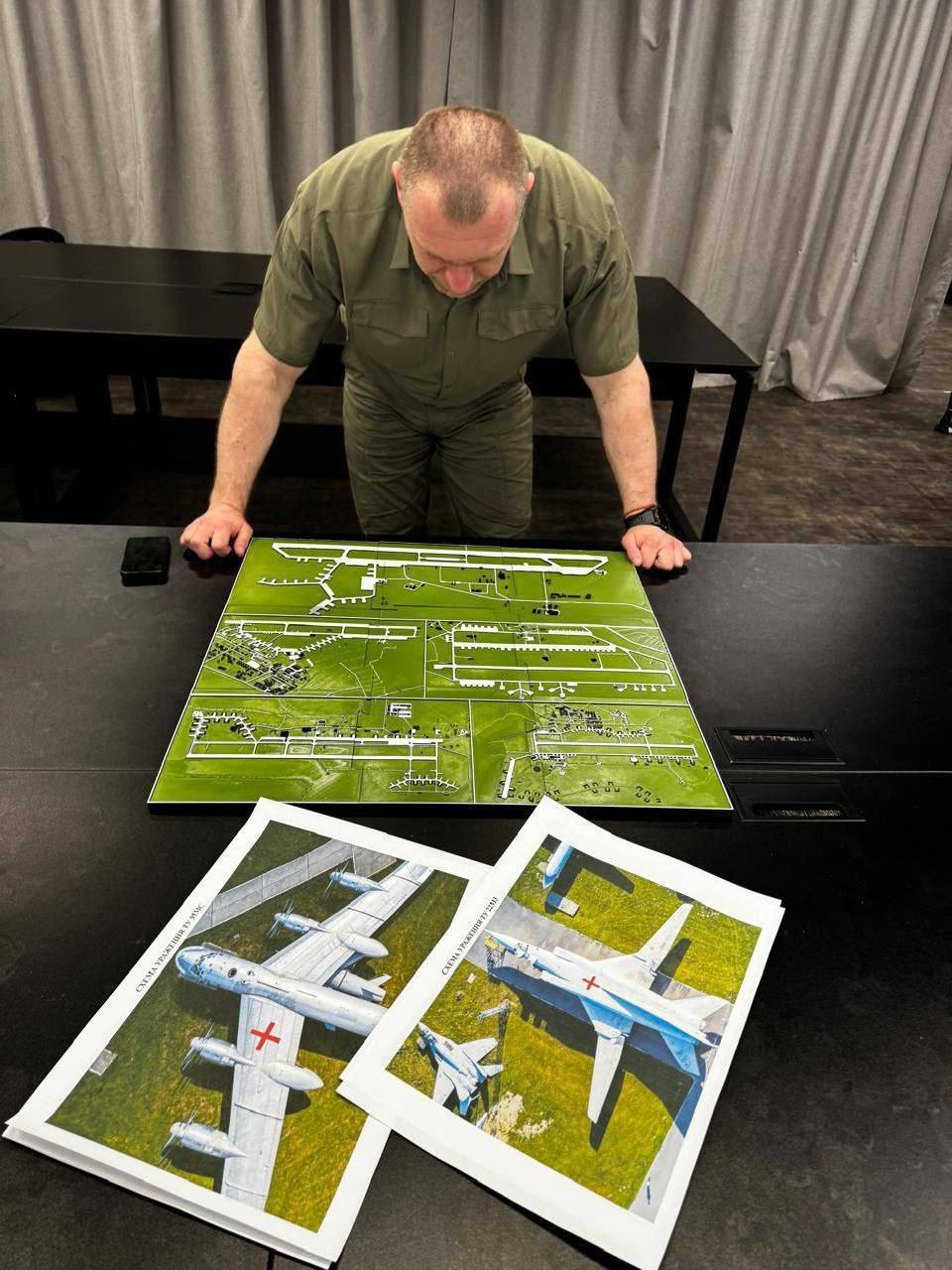
✈️🔥 Details of Operation "Web" from Yuri Butusov:
▪️SBU agents transported 150 small attack drones and 300 ammunition to the territory of Russia.
▪️116 drones took to the air.
▪️The attack on the Tu-95 aircraft base at the Olenya airfield was particularly successful - drones hit refueled fuel tanks and a large number of aircraft burned to the ground.
▪️As a result of the attack, 41 aircraft at 4 bases were confirmed to have been damaged.
⊥ᵒᵚ Cᵸᵎᶺᵋᶫ∸ᵒᵘ ☑️
boosted


⊥ᵒᵚ Cᵸᵎᶺᵋᶫ∸ᵒᵘ ☑️
boosted

Meet the new moderator team at #Fosstodon 🥳
⊥ᵒᵚ Cᵸᵎᶺᵋᶫ∸ᵒᵘ ☑️
boosted

Those of you who use an *open* text chat solution at work, what protocol is it based on?
Select multiple options only if you use more than one of these with some regularity, please.
Boosts appreciated.
(For avoidance of doubt, "something else" does *not* include proprietary solutions like Slack. If all the chat options you have at work are proprietary, you're not an intended respondent. 🙂 But you can still boost!)
⊥ᵒᵚ Cᵸᵎᶺᵋᶫ∸ᵒᵘ ☑️
boosted
🆕 blog! “Mobile Phones of Doctor Who - Season 15”
Is it Season 15 of New Who? Series 2 of Ncuti Gatwa's Who? Series 1875 of the UNIT dating controversy? Either way, welcome back to this increasingly silly series of blog posts where I try to identify all the mobile phones used by The Doctor and their companions.
This weird and wonderful series has, sadly, a paucity of …
👀 Read more: https://shkspr.mobi/blog/2025/06/mobile-phones-of-doctor-who-season-15/
⸻
#DoctorWhoPhones #DoctorWho
⊥ᵒᵚ Cᵸᵎᶺᵋᶫ∸ᵒᵘ ☑️
boosted


Le Sigh. RTD gonna RTD. #DoctorWho
- thefalken
- Codeberg
- https://codeberg.org/falken
Lead dev at UK company for ☁️,📱 & 💻. Views own.
Got an AI degree before it was a bubble.
Likes : 🐕, 🧱, 🐧,🚀, sci-fi, whisky, electronic 🎶 and retro 🖥️
Dislikes : Long bios
He/him
Joined Nov 2022
