

*banned 4 MarkDown love* @design_RG@qoto.org
- Blog W.Freely :
- https://write.tedomum.net/rgx/
- Glitch-Social :
- https://muensterland.social/@rgx
- Pleroma :
- https://fedi.absturztau.be/yann
- Cats ! :
- https://catgram.jp/@yann2
Books, Bicycles & Cats, Life is Good. Books, hardcover. Bikes, Classic sport and Touring ones. Cats, any colour or size. Aquarius with Virgo rising. INTJ.
STEM Lord, House of Ravenclaw.
I have moved -- please visit my other accounts.
* Follow my Main & Publishing account : https://muensterland.social/@rgx
* Cats photos, now posted at Catgram.Jp : https://catgram.jp/@yann2
* Pleroma Home is at FAB : https://fedi.absturztau.be/yann
Spoken & Written Languages : English. Español. Português.
Joined Nov 2019
QOTO.org new January 2020 Features Added - 5 - Account Subscriptions.
As per the original annoucement post by @freemo :
"Account Subscriptions - This allows you to follow a remote accounts public toots in your Home timeline without actually following them, great for following users with locked accounts."
So this is another new and unique feature -- we can see posts from users similarly as if we Followed them, but without actually Following them.
Why would someone be interested in that?
- For Locked accounts (which display a small padlock besides the user name); these normally will require you to click the "Follow" button as usual, but will only work once the user approves your follow request.
- so you can get similar access, but only to their "Public" posts. You will not see "Unlisted" or "Followers Only" posts.
- If this is an account you have a slight interest in, that might be enough.
Isn't this snooping, or uncool, or frowned upon? No, not at all.
- we can only see posts that were made with "Public" privacy setting at their original instance.
- these posts will be Federated and will join the millions of others in the Home and Federated feeds.
The advantage is that we see them in the same way we see the posts from users we actually Follow.
How to "Subscribe" to a user?
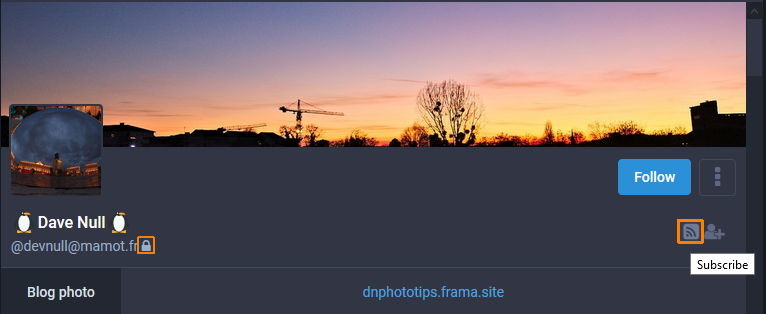
- If you visit any user's Profile page, you will see a new "Subscribe" icon, which looks a bit like the typical WiFi one (see screenshot #1)
- Notice that this particular user has a Locked profile (padlock icon beside his username, as highlighted in screenshot #1)
- Regardless of the Locked Following, we click on the Subscribe button.
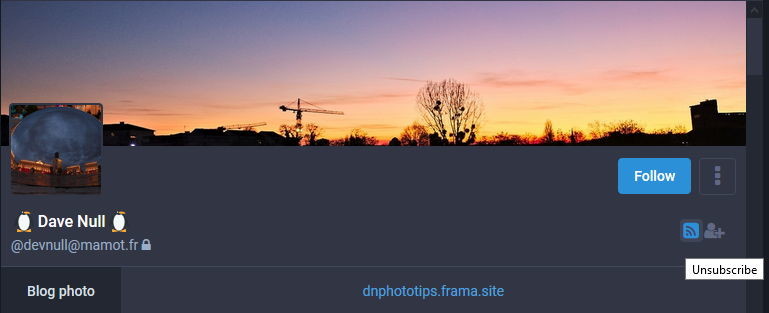
- and it immediately switches to a Blue, highlighted button, indicating a Subscribed account.
- bringing the mouse over it shows an "Unsubscribe" action legend (see screenshot #2)
From this point on, things will work very similar to being a Follower to that user.
- you will see any of their new Public posts in your "Home" timeline (the one with the little House icon).
- you will not see posts if they were made with more restricted Privacy settings (Unlisted, Followers only, or Direct Messages)
- And if you are no longer interested, visit their profile and unsubscribe from them, similar to Unfollowing a user.
** This post can also be seen in Prettier form at the Discourse Forum : https://discourse.qoto.org/t/qoto-org-new-january-2020-features-added-detailed-descriptions/192/8
** Why, Prettier? Because.. Text formatting, Header sizes, Bold and Italicized text styles, Inline images inserted in the proper place on the text, that's why. 😛
I had the idea of check how these Quote Posts look like in other instances. Just did, and found that...
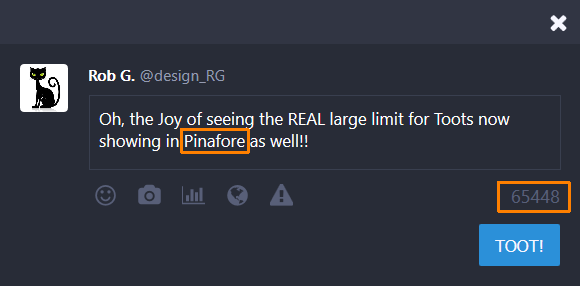
- it looks poor on GlitchSoc, similar to the Pinafore snapshot above.
BUT...
It looks PERFECT in a Pleroma node.
QOTO.org new January 2020 Features Added - 4 - Domain Subscriptions.
As per the original announcement post by @freemo :
"Domain Subscriptions - Bring another instance's local timeline as a feed in QOTO, no need to have an account on another server again, just import their timeline here!"
So this is another new and unique feature -- we can add another instance's Local timeline and view it locally here at our own instance.
Why would someone be interested in that?
- for diversity : the fediverse has a myriad of instances, and that means there's many different places. Some are big, some are small, many we can't even read the local languages, but it's fun to travel and see.
- when things get quiet at Qoto's local timeline... we open one of these and have freshly posted content from whichever instance we selected.
Isn't this snooping, or uncool, or frowned upon? No, not at all.
- we can only see posts that were made Public at their original instance.
- these posts will be Federated and will join the millions of others in the Home and Federated feeds.
The advantage is that we see them in the same way we see the posts made locally here at Qoto:
- a local timeline tends to be a place where there's more socializing, as we see each other's posts daily.
- we see all the local's posts, not only a few we followed.
- if some local event or news item is trending, we can see and participate in that with less distractions.
So, makes sense why you could want to try this? How to do it then?
- Select the "Gear" icon, to access the Mastodon full page "Preferences" menus.
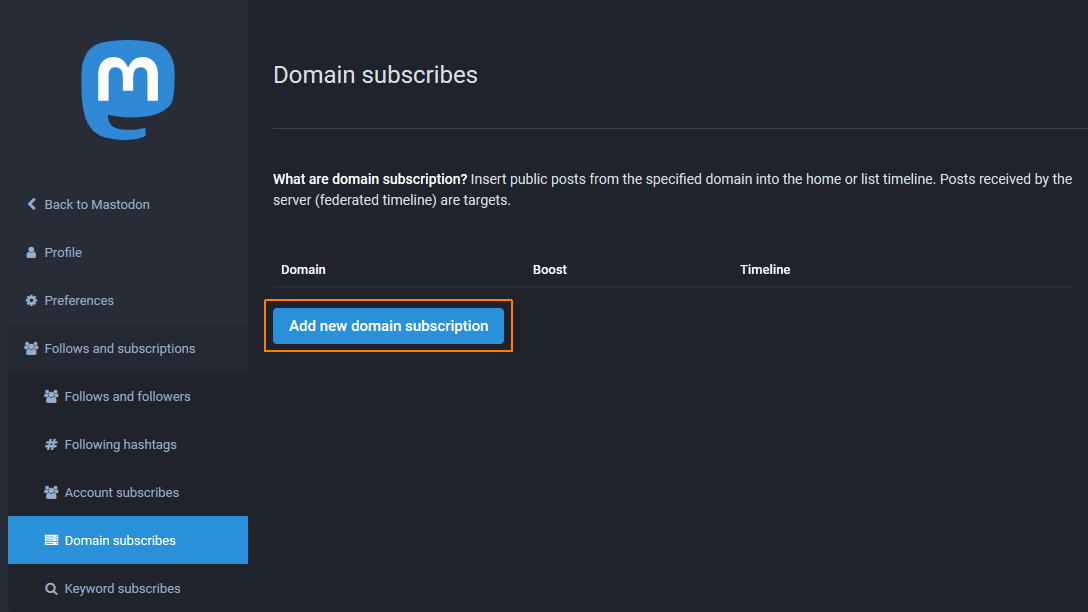
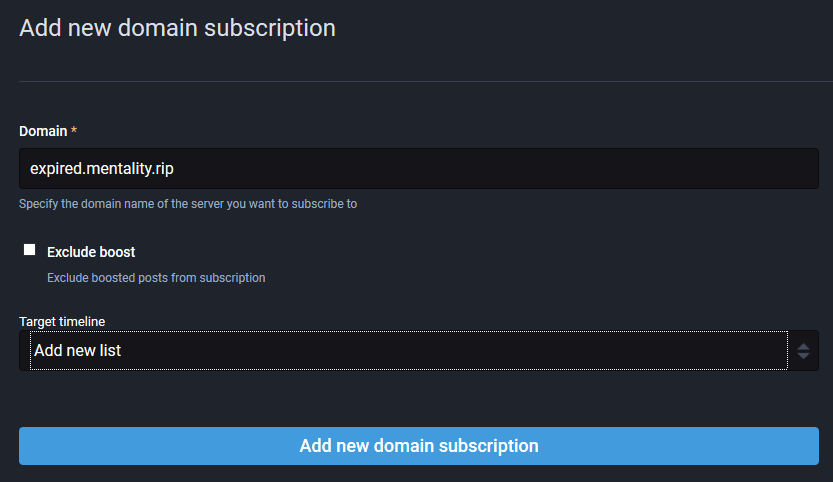
- On that page, navigate down to "Follows and Subscriptions" -- then select ¨Domain Subscribes¨. (see screenshot #1)
- on that section, click the ¨Add New Subscription¨, and enter the instance´s complete domain name. E.g. ¨mastodon.social¨ or ¨expired.mentality.rip¨
- Do NOT enter the HTTP or HTTPS protocol as in the normal browser URL. Here it isnt required.
Finished that, you will see the saved new domain added to your list.
Accessing the Subscribed Domains :
- From the main Mastodon Web client screen, look for the ¨Lists¨ item in the right side menu (see screenshot #3)
- From the list of subscribed domains, select the one you want to look at.
- it will now display the most recent posts in a column, just like the local timeline. (see screenshot #4)

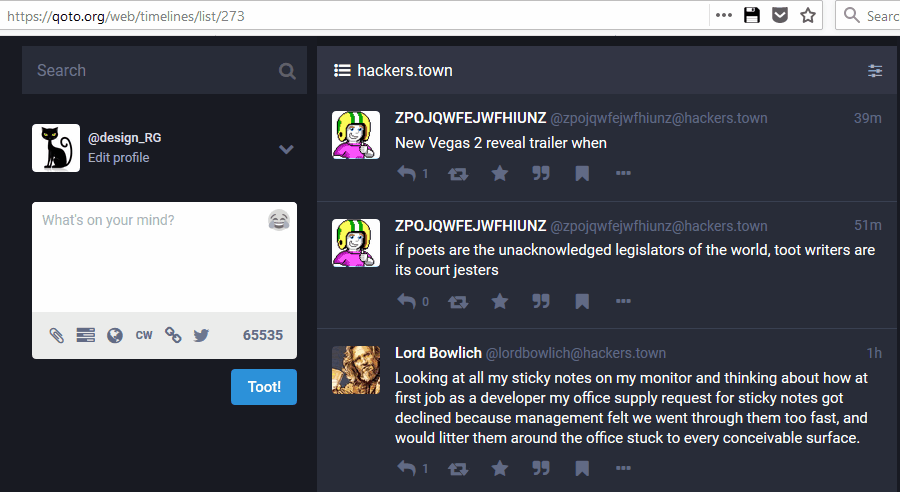
I mentioned that this feature is present (and our code derived from theirs) in GlitchSoc instances.
Here's an example of the Non-Federating Post control on a GlitchSoc instance (Hackers.town once again).
** We thank Renato Lond, the admin from https://masto.donte.com.br/ for porting the code from GlitchSoc and creating a Mastodon version, which he added to the main project Git.
Renato pointed me to https://github.com/tootsuite/mastodon/pull/8427 for the code in question.

QOTO.org new January 2020 Features Added - 3 - Non-Federating, Strictly LOCAL posts.
Another desirable feature in Mastodon (which is already present and used in GlitchSoc instances) is to have Strictly LOCAL, non-Federating posts.
What defines these posts?
- The root idea is that they will NOT be shared or sent anywhere else, but stay visible only in the instance where the Toot was posted.
- The choice you made here is to create a post that is only for the local, logged in users.
- All the other normal Toot Privacy settings can still be used - a non-federating toot could be Public, Unlisted, Followers only (in this case, only Follower users in the same instance would see it) or a Direct Message (showing only to *Local* users mentioned in the Toot text).
Why do we need this feature?
- It's an option to the author of the post, sometimes they might have a small audience in mind, just some local users.
- sometimes the content of the Toot is relevant to local users only, like an event happening soon after.
- or you might be looking for help and someone who is close enough physically to respond, meet, etc.
How is controlled and selected?
- We have a new "Chain" icon in the tools are of the Toot Editor. (see screenshot #1)
- Clicking on the "Chain" icon will present the two possible choices: a normal, Federated toot (which will be shared and spread on the Fediverse.)
- Or a Strictly Local, non-Federating toot, which is selected via the "broken chain" icon. (see screenshot #2)
The same "broken chain" icon will be displayed in the lower part of any toot posted in the instance which used this option.
See an example of Non-Federated Toot, note the Broken Chain icon is there, see screenshot #3.


And just to show, this is what it looks like (identical) in a GlitchSoc instance.
(Hackers.town in this example)

QOTO.org new January 2020 Features Added - 2 - Bookmarks.
A much desired feature in Mastodon (which is already present and used in GlitchSoc instances) is to have "Bookmarks".
- a way to save the location of important content; your own, for reference and reuse, or someone else's neat, relevant post.
- Mastodon has the "Favourites" (thank you Eugen for the UK spelling!) which could theoretically do;
- but which is most commonly used as a "Like" button, I seen your post, thanks buddy, etc.
So we didn't have any good way to keep track of neat posts other than :
- maybe using a special hashtag; like @Full_marx 's ingenious #bookmarx idea.
- or laboriously copying the Toot URL and pasting it into a text file.
Fear not -- Like the GS elite, we now have Bookmarks in our instance. How to use them?
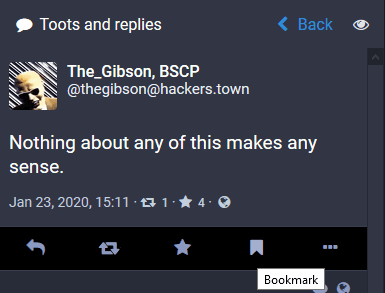
- Add a bookmark for any Toot, reply, etc - by simply selecting the little flag icon under it. (screenshot #1)
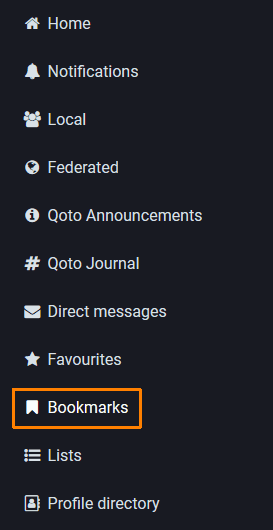
Access that Bookmark via the "Bookmarks" List in the right side panel of your Webclient (or somewhere else in a mobile client, it could vary.). (screenshot #2)

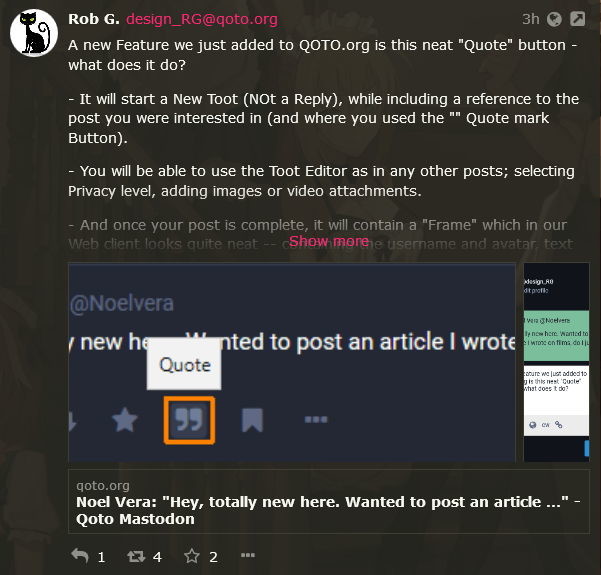
Here are Two screenshots showing what a Quoted post looks like (our sys admin here, who Quoted my own post above in a new message).
a. As seen in our instance, with the Mastodon Web Client.
b. as seen via Pinafore, and other mastodon clients (possibly also the same in other Mastodon instances Web Clients).
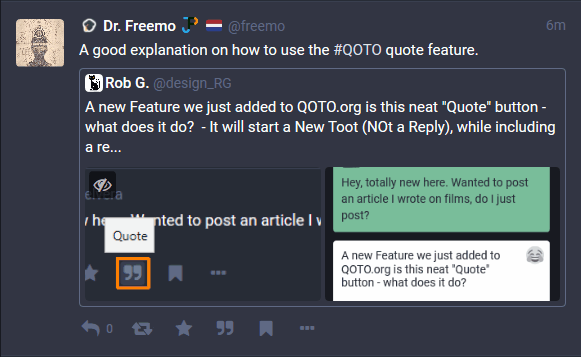

A new Feature we just added to QOTO.org is this neat "Quote" button - what does it do?
- It will start a New Toot (NOt a Reply), while including a reference to the post you were interested in (and where you used the "" Quote mark Button).
- You will be able to use the Toot Editor as in any other posts; selecting Privacy level, adding images or video attachments.
- And once your post is complete, it will contain a "Frame" which in our Web client looks quite neat -- containing the username and avatar, text of the Quoted post.
- That Frame is also a Live link to that original post, so people can quickly jump to it if desired.
Simple, quick, and it will not break other Mastodon clients; they will simply show a simplified version of the info we see here.
(It will be similar to the many Retweet posts, with a link to the original Toot)

Hey, totally new here. Wanted to post an article I wrote on films, do I just post?


Oh, the Joy of seeing the REAL large limit for Toots now showing in Pinafore as well!!
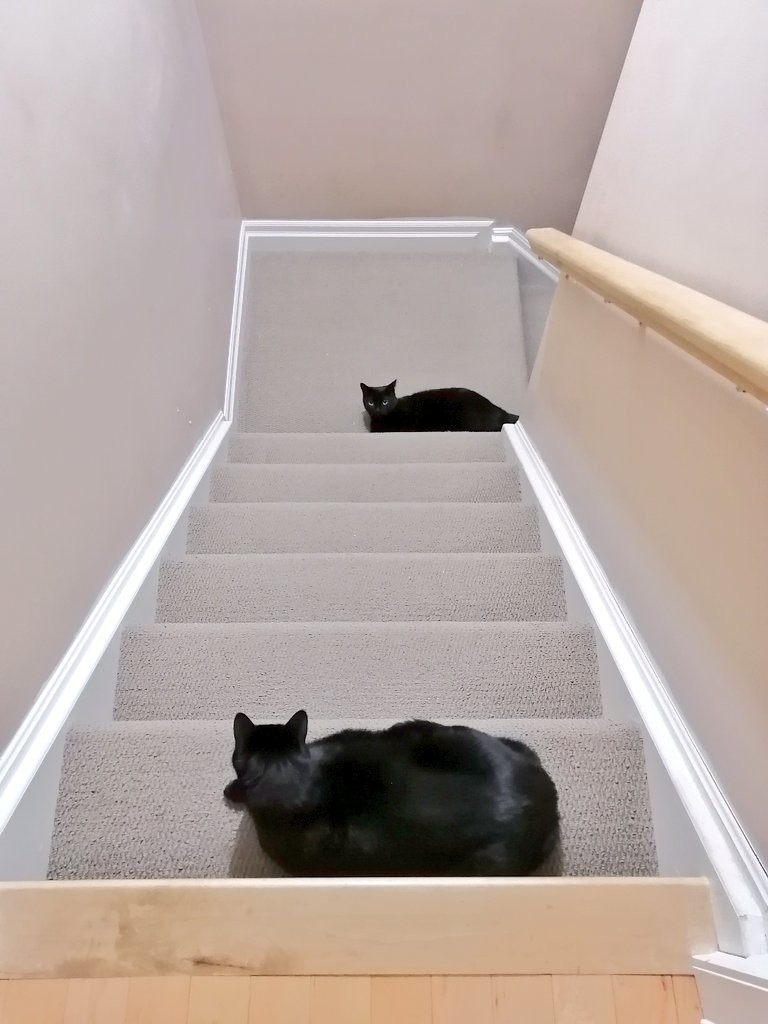
💕those two gorgeous #BlackCats
#CatsofMastodon #Mastocats #meow #xp
---
RT @CatDisapproval
Watching you watching me watching you.
https://twitter.com/CatDisapproval/status/1219322146096394241
Verifying that the Update is done?
Windows Key -- Updates -- View Update History.
In the list, you should see an entry similar to this one. The KB (Knowledge Base) number could be different, as it is a different patch and KB issue for the different sub-versions currently out there.

* Regarding the Windows 10 January Vulnerabilty and the Importance of patching it! *
The NSA came out in public to announce this vulnerability, a sign of their concern and how serious this could potentially be.
Microsoft has made patches for the various versions of Windows affected.
However -- it's possible that your own machine hasn't received the update yet, as there sometimes other pending updates, etc and things might get blurry.
A user has posted a direct link to the Microsoft Advisory page for this, and the page has links to each of the correct fixes to be downloaded and applied, depending on what version of Windows you have running, the patch level, processor type (x86 32 bits, or x64 64 bits ones)
Please consider checking your own system - and manually getting and installing the proper patch if not installed yet.
Steps I would suggest :
1. Find out the current Windows version you have running. This might very even if you do have Windows 10 running. Open a commmand line --> Windows button, then type "Winver", which will run a Windows Version program, that displays on a new window your current system info.
2. Write down the Version and processor type. E.G., version 1809 64 bits, or 1903 32 bits, etc.
3. Open the Microsoft Advisory page here : https://portal.msrc.microsoft.com/en-US/security-guidance/advisory/CVE-2020-0601
4. Locate the proper version of patch for your system -- based on the current version level you are running.
5. Click on that type, and a new window will open, offering download options. Select the file with the proper processor architecture to match yours; either x86 which is for 32 bit versions, or x64 for 64 bit versions (more likely on newer computers and laptops).
6. Click on the correct file and it will download. It is a LARGE file, so wait until it's completed.
7. Once the download is completed, you can click on the file and allow it to install as a "manual update".
8. Since the patch files are fairly large, the installation will take a bit of time. Wait for it to finish, you can do other tasks while waiting.
9. Once it completes installing, it will prompt you for a Restart. Do it. Now.
10. Done? It will reboot, installing the patches during the shutdown process.
11. Verify the Install? You can go into the Windows -- Updates -- Show Update History list, and you should see a new update with today's date installed in the list.
Good luck, and please make sure to have all your home and work machines updated ASAP...


A good read and with a surprising Scientific analysis.

And it's official -- the Release version of Microsoft Edge browser, the new branch which uses the Chromium rendering engine, is ready for Downloads.
In Windows, iOS, Mac OSX, Android versions.
See it at : https://www.microsoft.com/en-us/edge
ES 🇪🇸
Y ahora es oficial - la nueva version del navegador Edge de Microsoft está pronta para quien quiserla.
En Windows, iOS y Android para los telemoviles, Mac OSX también.
Veer a : https://www.translatetheweb.com/?ref=TVert&from=&to=es&a= https://www.microsoft.com/en-us/edge

#QotoJournal is being launched.
We had a suggestion made and considered, and a discussion thread posted at our Discourse Forums - see : https://discourse.qoto.org/t/special-hashtag-to-highlight-serious-posting-at-qoto-org/180
The idea is to have a default hash tag that can identify more serious posting, articles, blog pages, etc being produced by members of our instance.
The discussion has been opened for two weeks, and I feel it's time to launch - so here it goes, we are adopting this as our tag.
* For the tag, the text case doesn't matter -- QOTOJournal, or QotoJournal will give the same results.
Will prepare a separate post later with suggestions and guidelines for posting content, to create a bit of a Style we can identify at a glance.
Thank you to my friend who sent this idea, and to all who supported it, participating in previous discussions here in the Local feed or at the forum post.
My thoughts on the matter were disclosed also on my blog at : https://write.tedomum.net/rgx/special-hashtag-to-highlight-serious-posting
** This post was edited via "Delete/ReDraft" to incorporate a suggestion of using QotoJournal -- without underscore, as it seems a good idea.


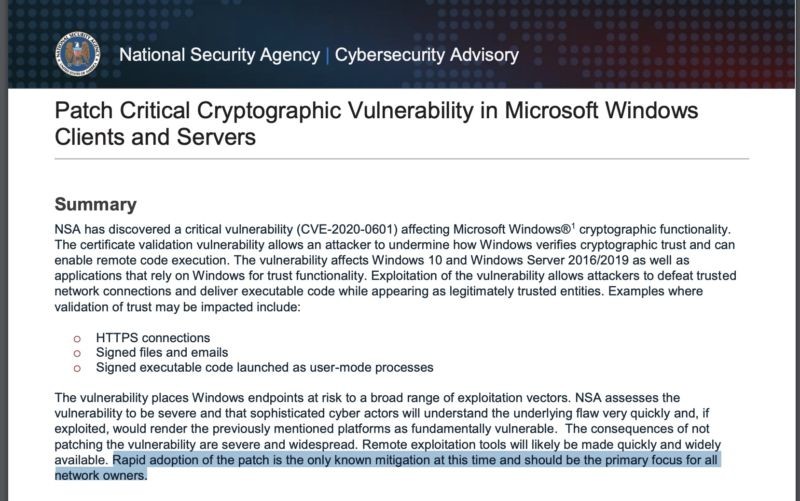
** Windows Update -- important security risk, read and patch ASAP. **
The NSA has notified Microsoft of a serious vulnerabilty in Windows 10, and some of the Server versions, which is related to the authentication of secure web connections.
Ars Technica has an article, it's also all over the Tech press probably.
For the NSA to come out and give away this (an exploitable error) is an indication of how serious it is.
On small mindedness and shitty Fediverse politics. Long Post.
I came across a post by sheer serendipity a few minutes ago, while looking at a user profile in a different instance.
It mentioned a hashtag that was suggested for using on reporting and recommending blocking or banning other Fediverse instances. It uses the hash "fediblock" -- and I avoided using the # in this case to not have this post added to it, unintended.
Reading thru I found mentions to various instances, and reasons people had for suggesting their banishment. Was suprised by finding a mention to a Pleroma instance where I have joined, and also a mention that "Qoto people had alts there". 😎
The poster then proceeded to criticize the Pleroma admin and even his personal project called Husky, a fork of the popular "Tusky" android mastodon client.
Husky's goal is primarily to provided support for advanced Pleroma features like Rich Text Formatting -- which Pleroma users can use in their Toots, via html tags, MarkDown or even BBcode.
While I see this as a sign of progressive thinking, and the willingness to take on a project, the author of the critical post was adamant that Husky would or could allow Gab users to use it for their own needs; which Tusky has blocked on their own client.
I have informed the admin and developer of this, and he was aware and didn't mind.
It does bother me, the small mindedness I see in such petty fediverse politics.

"The solution to the plastic waste crisis? It isn’t recycling", byJohn Vidal.
Excellent article, right on point.
"The plastic makers and supermarkets are rightly held to account, but it is the voracious “take-make-dispose” industrial model identified by people such as Ellen MacArthur that has led directly to the state we are now in. The plastic waste crisis is just the symptom of a single-use culture."

- Blog W.Freely :
- https://write.tedomum.net/rgx/
- Glitch-Social :
- https://muensterland.social/@rgx
- Pleroma :
- https://fedi.absturztau.be/yann
- Cats ! :
- https://catgram.jp/@yann2
Books, Bicycles & Cats, Life is Good. Books, hardcover. Bikes, Classic sport and Touring ones. Cats, any colour or size. Aquarius with Virgo rising. INTJ.
STEM Lord, House of Ravenclaw.
I have moved -- please visit my other accounts.
* Follow my Main & Publishing account : https://muensterland.social/@rgx
* Cats photos, now posted at Catgram.Jp : https://catgram.jp/@yann2
* Pleroma Home is at FAB : https://fedi.absturztau.be/yann
Spoken & Written Languages : English. Español. Português.
Joined Nov 2019
