

*banned 4 MarkDown love* @design_RG@qoto.org
- Blog W.Freely :
- https://write.tedomum.net/rgx/
- Glitch-Social :
- https://muensterland.social/@rgx
- Pleroma :
- https://fedi.absturztau.be/yann
- Cats ! :
- https://catgram.jp/@yann2
Books, Bicycles & Cats, Life is Good. Books, hardcover. Bikes, Classic sport and Touring ones. Cats, any colour or size. Aquarius with Virgo rising. INTJ.
STEM Lord, House of Ravenclaw.
I have moved -- please visit my other accounts.
* Follow my Main & Publishing account : https://muensterland.social/@rgx
* Cats photos, now posted at Catgram.Jp : https://catgram.jp/@yann2
* Pleroma Home is at FAB : https://fedi.absturztau.be/yann
Spoken & Written Languages : English. Español. Português.
Joined Nov 2019
QOTO.org new January 2020 Features Added - 6 - Quick View Remote Timeline.
This is something I have just discovered, as I prepared screenshots for a previous post.
It is similar to the "Domain Subscriptions" feature listed previously. But :
- It can be done from ANY post, and allows you to instantly open a column showing the originating Instance's Local Timeline.
- Done taking a look? Just back out of it, open any other timeline and move on.
If you liked what you see in their timeline, then you could consider Domain Subscribing as described at https://discourse.qoto.org/t/qoto-org-new-january-2020-features-added-detailed-descriptions/192/7 .
* Why would someone be interested in that?
- for diversity : the fediverse has a myriad of instances, and that means there's many different places. Some are big, some are small, many we can't even read the local languages, but it's fun to travel and see.
- when things get quiet at Qoto's local timeline... we open one of these and have freshly posted content from whichever instance we selected.
Isn't this snooping, or uncool, or frowned upon? No, not at all.
- we can only see posts that were made Public at their original instance.
- these posts will be Federated and will join the millions of others in the Home and Federated feeds.
* How do we open this Quick View into a Remote Instance ?
Reminding everyone that this feature is now available here at Qoto.org, and it will not work elsewhere (unless the instance installed similar modified software).
But, I was really surprised on finding it here too - even @freemo hasn't mentioned it, and likely is unware this is now possible.
- From ANY post in the Home or Federated feeds, click on the "..." Dots menu in their lower part.
- There are various options, some quite useful for controlling unwanted content (mute, report, etc.)
- And on this list we now find "*Open instance.name timeline*". (see screenshot #1)
- Voilá.. Click on that, and the screen will display a Full column of the remote instance posts; their Local timeline in fact. (see screenshot #2)
As shown in the screenshot, *we are still on the qoto.org domain*, but the timeline displayed is from ***blob.cat's posts***.
That's it, simple as that!
Like it? See the instructions and Subscribe to their Domain if desired --> https://discourse.qoto.org/t/qoto-org-new-january-2020-features-added-detailed-descriptions/192/7
** You can also see this post in prettier, easier to Read format at the Discourse Forum : https://discourse.qoto.org/t/qoto-org-new-january-2020-features-added-detailed-descriptions/192/9
** Why, Prettier? Because.. Text formatting, Header sizes, Bold and Italicized text styles, Inline images inserted in the proper place on the text, that's why. 😛
...and as it turns out, I think I just discovered a new, enhanced and so far undocumented Feature added to our Qoto mastodon Web Clients.
Woot...
Now preparing a post for it (hint: viewing Remote instance local timelines VERY easily, without the Subscribe Remote actions previously described)
QOTO.org new January 2020 Features Added - 5 - Account Subscriptions.
As per the original annoucement post by @freemo :
"Account Subscriptions - This allows you to follow a remote accounts public toots in your Home timeline without actually following them, great for following users with locked accounts."
So this is another new and unique feature -- we can see posts from users similarly as if we Followed them, but without actually Following them.
Why would someone be interested in that?
- For Locked accounts (which display a small padlock besides the user name); these normally will require you to click the "Follow" button as usual, but will only work once the user approves your follow request.
- so you can get similar access, but only to their "Public" posts. You will not see "Unlisted" or "Followers Only" posts.
- If this is an account you have a slight interest in, that might be enough.
Isn't this snooping, or uncool, or frowned upon? No, not at all.
- we can only see posts that were made with "Public" privacy setting at their original instance.
- these posts will be Federated and will join the millions of others in the Home and Federated feeds.
The advantage is that we see them in the same way we see the posts from users we actually Follow.
How to "Subscribe" to a user?
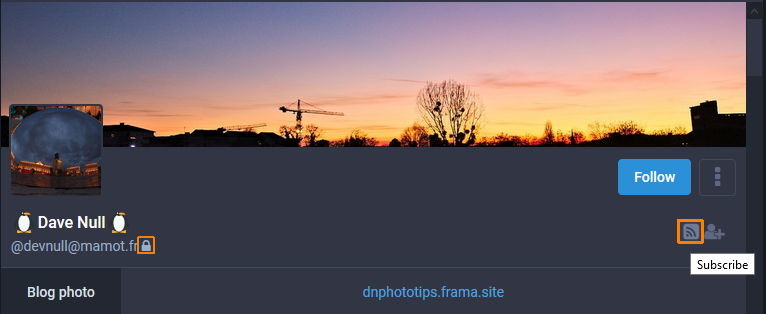
- If you visit any user's Profile page, you will see a new "Subscribe" icon, which looks a bit like the typical WiFi one (see screenshot #1)
- Notice that this particular user has a Locked profile (padlock icon beside his username, as highlighted in screenshot #1)
- Regardless of the Locked Following, we click on the Subscribe button.
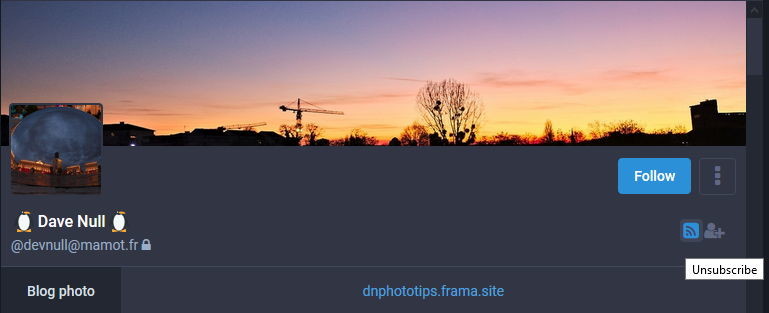
- and it immediately switches to a Blue, highlighted button, indicating a Subscribed account.
- bringing the mouse over it shows an "Unsubscribe" action legend (see screenshot #2)
From this point on, things will work very similar to being a Follower to that user.
- you will see any of their new Public posts in your "Home" timeline (the one with the little House icon).
- you will not see posts if they were made with more restricted Privacy settings (Unlisted, Followers only, or Direct Messages)
- And if you are no longer interested, visit their profile and unsubscribe from them, similar to Unfollowing a user.
** This post can also be seen in Prettier form at the Discourse Forum : https://discourse.qoto.org/t/qoto-org-new-january-2020-features-added-detailed-descriptions/192/8
** Why, Prettier? Because.. Text formatting, Header sizes, Bold and Italicized text styles, Inline images inserted in the proper place on the text, that's why. 😛
@freemo
I just gave it a polishing pass, adding Header sizes, ocasional Bold and Italicized styles here and there, and it's pretty. 😄
Reseved a couple of replies at the bottom to add this new feature that pschwede mentioned and I had missed. Will prep a toot later and once done add it to the Forum thread as well.
It's really neat to have the Forum, as it allows for some beautiful formatting, and insertion of images inline, inside the text blocks -- much like a magazine article, and better than we could ever do on a Toot.
Good question -- and that is a new feature I missed making an explanation post for.
The forum post is all ok, other than this new feature I had missed explaining.
But I will make a post later this morning (in Mastodon), and later copy it to the Forum thread, so it's ok if you want to link it in any announcements.
@freemo Screenshot of masto.donte.com.br in wide screen, showing the Green Theme I mentioned...
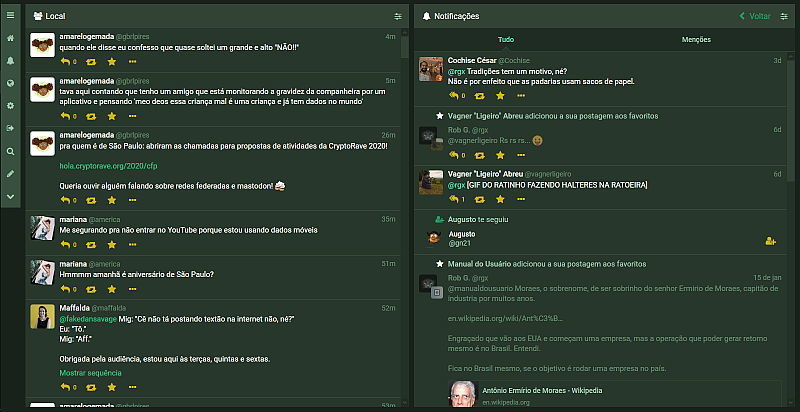
@freemo And I have expanded the niceness of our optimized WideScreren Dark Theme even more with my usage of the Firefox Collapsed Mastodon add-on.
As shown in this screenshot attached, taken as I wrote the post above, it will open a Toot Editor right below a post, anywhere -- click the Reply arrow, and it pops up.
Which means we can free the vertical space at the Left side -- normally reserved for the Toot Editor and a Replied message preview above it.
Now this would be a tremendous thing to add to Mastodon itself. A great idea, imo.
I should go and dig up the Dark Green theme that Renato Lond has at masto.donte.com.br, as the colours he uses are great visually - comforting green background, but with some nice contrasting elements, like buttons and scroll bars, much easier to find than in the Mastodon Dark Theme (scroll bars particularly, as there's a small difference in shade between them and the surrounding areas only)
@freemo What I really think is unique and highly valuable -- and VERY uncommon, as I have only seen it here and at Todon.nl, is to have a theme that uses the Wide screens in our laptops properly.
Geez, that is one sore point, I have to get back into a campaign for promoting that.
The AWI setting does add some use to the wider screens, but it's too much like TweetDeck (Eugen's admitted inspiration for its design). And the columns widths are TOO Skinny, unless you want 4 columns with fast updating going on, it's a pain.
The modifications you implemented here, (and that they have at Todon and no other instance that I have seen yet), these really allow for good use of the screen width.
I like my screen as Two columns -- one being the local timeline (at the left), the other containing the Notifications, or one of the other possible timelines (Home or God forbid, Federated madness).
@freemo LOL....
I am glad we kept the Full Width Dark Theme pure as it's delightful.
Less distractions, I say. 😛
@freemo @pschwede Could look at this Forum post as well, with each new major feature explained and illustrated.
https://discourse.qoto.org/t/qoto-org-new-january-2020-features-added-detailed-descriptions/192
*banned 4 MarkDown love*
boosted



Ridiculous that I have to run errands and go to work today, instead of just sitting under a blanket with this guy

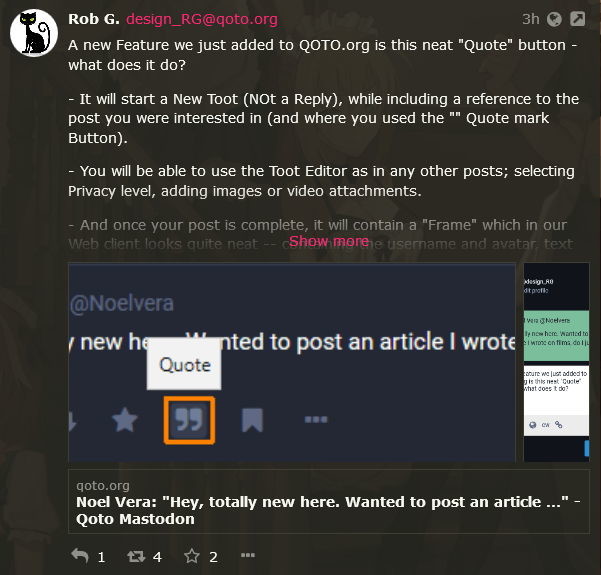
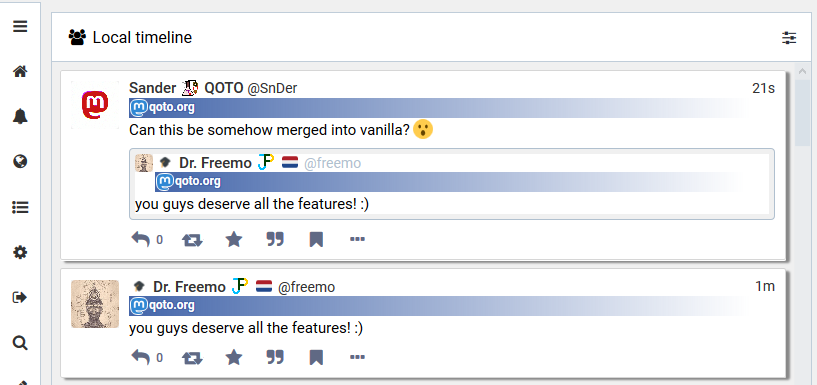
I had the idea of check how these Quote Posts look like in other instances. Just did, and found that...
- it looks poor on GlitchSoc, similar to the Pinafore snapshot above.
BUT...
It looks PERFECT in a Pleroma node.
I just finished creating a Discourse Forum thread with copies of the series of toots about the New Features for Qoto.org.
They contain the same text and images, in a single thread for all 4 major new features.
If anyone wants to see it, its at https://discourse.qoto.org/t/qoto-org-new-january-2020-features-added-detailed-descriptions/192
@freemo No, I am ok with the theme as it is, there are others that can run full screen width, dark and with the instance ticker already incorporated.
so, leave it as is, TY...
@freemo LOL, I can´t believe how BRIGHT that theme is. OMG... 😄
I use the Dark, Full Width theme, with animated gifs banished as much as possible. No, I think I am ok with this, thank you.
I love the way I have the full screen width in use, no thanks to Eugen who doesn´t understand some people want AWI but NOT four madly tickign timelines at once.
The Firefox Add'on Collapsed Mastodon has some features that I wish would become mainstream Mastodon.
Like opening a reply Toot Editor anywhere in the screen, wherever I press the ¨Reply¨ button.
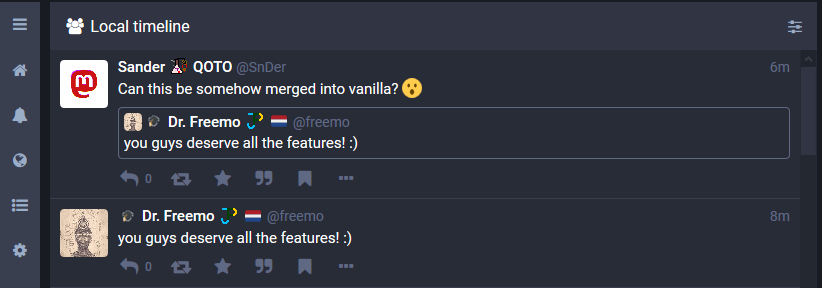
@freemo For the QOTO Default Theme, aka Lights ON !!! 😜
...me needs shades...
- Blog W.Freely :
- https://write.tedomum.net/rgx/
- Glitch-Social :
- https://muensterland.social/@rgx
- Pleroma :
- https://fedi.absturztau.be/yann
- Cats ! :
- https://catgram.jp/@yann2
Books, Bicycles & Cats, Life is Good. Books, hardcover. Bikes, Classic sport and Touring ones. Cats, any colour or size. Aquarius with Virgo rising. INTJ.
STEM Lord, House of Ravenclaw.
I have moved -- please visit my other accounts.
* Follow my Main & Publishing account : https://muensterland.social/@rgx
* Cats photos, now posted at Catgram.Jp : https://catgram.jp/@yann2
* Pleroma Home is at FAB : https://fedi.absturztau.be/yann
Spoken & Written Languages : English. Español. Português.
Joined Nov 2019
