

*banned 4 MarkDown love* @design_RG@qoto.org
- Blog W.Freely :
- https://write.tedomum.net/rgx/
- Glitch-Social :
- https://muensterland.social/@rgx
- Pleroma :
- https://fedi.absturztau.be/yann
- Cats ! :
- https://catgram.jp/@yann2
Books, Bicycles & Cats, Life is Good. Books, hardcover. Bikes, Classic sport and Touring ones. Cats, any colour or size. Aquarius with Virgo rising. INTJ.
STEM Lord, House of Ravenclaw.
I have moved -- please visit my other accounts.
* Follow my Main & Publishing account : https://muensterland.social/@rgx
* Cats photos, now posted at Catgram.Jp : https://catgram.jp/@yann2
* Pleroma Home is at FAB : https://fedi.absturztau.be/yann
Spoken & Written Languages : English. Español. Português.
Joined Nov 2019
@Xoktz Esta - la Casa de José Saramago, también conoscida como la Casa de los Bicos.

@Xoktz Ah, no, pero amo la ciudad. y esta edificaccion se parece mucho con una allá. 😄
@freemo Yes, I think Renato has chosen and created the current controls for the Local-Only posting feature.
And I think they are better than the GS ones, at this point - easier to understand even for new users.
I have seen many advanced features in the Pleroma project, which I would hope someday can reach mastodon also.
Rich Text formatting, they have it, and you have 3 options even.
- html tags.
- MarkDown tags.
- or BBcode ones.
@oxbowcoda Thank you, I am glad to see many new features added here. 👍
QOTO.org new January 2020 Features Added - 4 - Domain Subscriptions.
As per the original announcement post by @freemo :
"Domain Subscriptions - Bring another instance's local timeline as a feed in QOTO, no need to have an account on another server again, just import their timeline here!"
So this is another new and unique feature -- we can add another instance's Local timeline and view it locally here at our own instance.
Why would someone be interested in that?
- for diversity : the fediverse has a myriad of instances, and that means there's many different places. Some are big, some are small, many we can't even read the local languages, but it's fun to travel and see.
- when things get quiet at Qoto's local timeline... we open one of these and have freshly posted content from whichever instance we selected.
Isn't this snooping, or uncool, or frowned upon? No, not at all.
- we can only see posts that were made Public at their original instance.
- these posts will be Federated and will join the millions of others in the Home and Federated feeds.
The advantage is that we see them in the same way we see the posts made locally here at Qoto:
- a local timeline tends to be a place where there's more socializing, as we see each other's posts daily.
- we see all the local's posts, not only a few we followed.
- if some local event or news item is trending, we can see and participate in that with less distractions.
So, makes sense why you could want to try this? How to do it then?
- Select the "Gear" icon, to access the Mastodon full page "Preferences" menus.
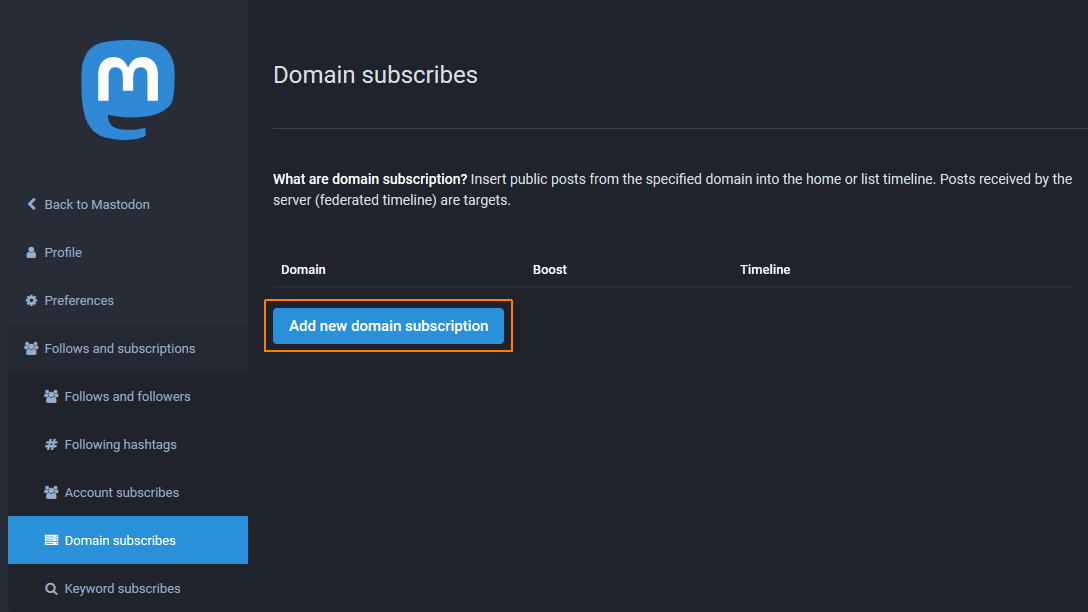
- On that page, navigate down to "Follows and Subscriptions" -- then select ¨Domain Subscribes¨. (see screenshot #1)
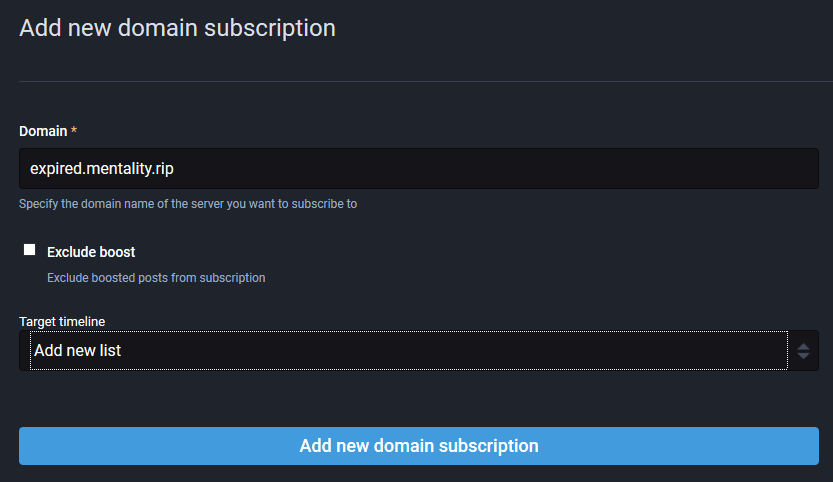
- on that section, click the ¨Add New Subscription¨, and enter the instance´s complete domain name. E.g. ¨mastodon.social¨ or ¨expired.mentality.rip¨
- Do NOT enter the HTTP or HTTPS protocol as in the normal browser URL. Here it isnt required.
Finished that, you will see the saved new domain added to your list.
Accessing the Subscribed Domains :
- From the main Mastodon Web client screen, look for the ¨Lists¨ item in the right side menu (see screenshot #3)
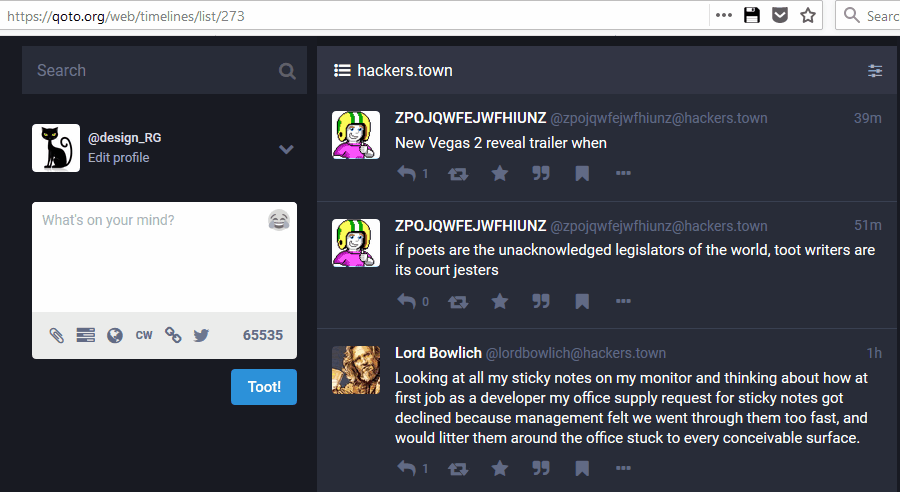
- From the list of subscribed domains, select the one you want to look at.
- it will now display the most recent posts in a column, just like the local timeline. (see screenshot #4)

@Shaheer Welcome to Qoto and the fediverse...
Enjoy the network and all it has to offer. If you are new to using Mastodon, there's a good guide here: https://lifehacker.com/a-beginner-s-guide-to-mastodon-1828503235
We also have another new users guide, posted here : https://write.tedomum.net/rgx/suggestions-and-guidelines-for-new-users-written-by-mastodon-art-administrator
@Xoktz Estás en Lisboa?
I mentioned that this feature is present (and our code derived from theirs) in GlitchSoc instances.
Here's an example of the Non-Federating Post control on a GlitchSoc instance (Hackers.town once again).
** We thank Renato Lond, the admin from https://masto.donte.com.br/ for porting the code from GlitchSoc and creating a Mastodon version, which he added to the main project Git.
Renato pointed me to https://github.com/tootsuite/mastodon/pull/8427 for the code in question.

@khird If you use the Favourites feature strictly to save good posts for later access, it will work as Bookmarks, and the same action could be used in any instance.
QOTO.org new January 2020 Features Added - 3 - Non-Federating, Strictly LOCAL posts.
Another desirable feature in Mastodon (which is already present and used in GlitchSoc instances) is to have Strictly LOCAL, non-Federating posts.
What defines these posts?
- The root idea is that they will NOT be shared or sent anywhere else, but stay visible only in the instance where the Toot was posted.
- The choice you made here is to create a post that is only for the local, logged in users.
- All the other normal Toot Privacy settings can still be used - a non-federating toot could be Public, Unlisted, Followers only (in this case, only Follower users in the same instance would see it) or a Direct Message (showing only to *Local* users mentioned in the Toot text).
Why do we need this feature?
- It's an option to the author of the post, sometimes they might have a small audience in mind, just some local users.
- sometimes the content of the Toot is relevant to local users only, like an event happening soon after.
- or you might be looking for help and someone who is close enough physically to respond, meet, etc.
How is controlled and selected?
- We have a new "Chain" icon in the tools are of the Toot Editor. (see screenshot #1)
- Clicking on the "Chain" icon will present the two possible choices: a normal, Federated toot (which will be shared and spread on the Fediverse.)
- Or a Strictly Local, non-Federating toot, which is selected via the "broken chain" icon. (see screenshot #2)
The same "broken chain" icon will be displayed in the lower part of any toot posted in the instance which used this option.
See an example of Non-Federated Toot, note the Broken Chain icon is there, see screenshot #3.


And just to show, this is what it looks like (identical) in a GlitchSoc instance.
(Hackers.town in this example)

QOTO.org new January 2020 Features Added - 2 - Bookmarks.
A much desired feature in Mastodon (which is already present and used in GlitchSoc instances) is to have "Bookmarks".
- a way to save the location of important content; your own, for reference and reuse, or someone else's neat, relevant post.
- Mastodon has the "Favourites" (thank you Eugen for the UK spelling!) which could theoretically do;
- but which is most commonly used as a "Like" button, I seen your post, thanks buddy, etc.
So we didn't have any good way to keep track of neat posts other than :
- maybe using a special hashtag; like @Full_marx 's ingenious #bookmarx idea.
- or laboriously copying the Toot URL and pasting it into a text file.
Fear not -- Like the GS elite, we now have Bookmarks in our instance. How to use them?
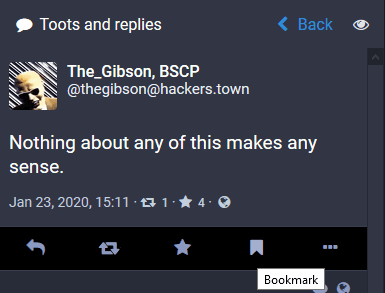
- Add a bookmark for any Toot, reply, etc - by simply selecting the little flag icon under it. (screenshot #1)
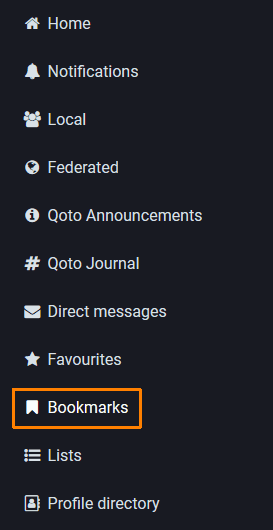
Access that Bookmark via the "Bookmarks" List in the right side panel of your Webclient (or somewhere else in a mobile client, it could vary.). (screenshot #2)

Here are Two screenshots showing what a Quoted post looks like (our sys admin here, who Quoted my own post above in a new message).
a. As seen in our instance, with the Mastodon Web Client.
b. as seen via Pinafore, and other mastodon clients (possibly also the same in other Mastodon instances Web Clients).
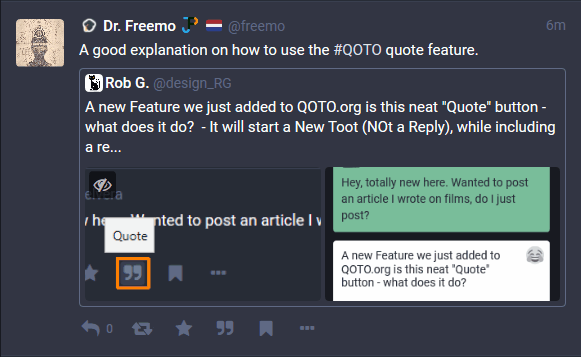

A new Feature we just added to QOTO.org is this neat "Quote" button - what does it do?
- It will start a New Toot (NOt a Reply), while including a reference to the post you were interested in (and where you used the "" Quote mark Button).
- You will be able to use the Toot Editor as in any other posts; selecting Privacy level, adding images or video attachments.
- And once your post is complete, it will contain a "Frame" which in our Web client looks quite neat -- containing the username and avatar, text of the Quoted post.
- That Frame is also a Live link to that original post, so people can quickly jump to it if desired.
Simple, quick, and it will not break other Mastodon clients; they will simply show a simplified version of the info we see here.
(It will be similar to the many Retweet posts, with a link to the original Toot)

Hey, totally new here. Wanted to post an article I wrote on films, do I just post?


You could maybe send a DM to William and ask what his plans are for additional work in the Guppe project? He's at @ datatitian@social.coop
@Noelvera Hello, Noel, yes, you can post a new Toot - and it will be sent all over the place.
Suggestions:
- Have a title line, space it at the top so it stands out.
- add an attractive image, related to your post's text.
f you are new to using Mastodon, there's a good guide here: https://lifehacker.com/a-beginner-s-guide-to-mastodon-1828503235
We also have another new users guide, posted here : https://write.tedomum.net/rgx/suggestions-and-guidelines-for-new-users-written-by-mastodon-art-administrator
@freemo
I think adding control and administration features to Guppe Groups would be excellent, right now it seems to be fully functional but there's no way to stop spamming or block any bad content.
Alex wrote a Blog post about Guppe and he mentioned the moderation problem, along with some suggestions -- including the First User becoming the group owner.
https://alexschroeder.ch/wiki/2019-09-26_Groups_on_Mastodon
Having Groups working would benefit users in many instances, not just Qoto. So if you do have some ideas and the time to work on it, it's a nice project.
@miguel31416 @Acuarela Hola y bienvenido(a). 😄
Si es nuevo en la red Mastodon, se puede veer un guia para nuevos usuarios ahi :
* "Guía básica de Mastodon para principiantes"
- Blog W.Freely :
- https://write.tedomum.net/rgx/
- Glitch-Social :
- https://muensterland.social/@rgx
- Pleroma :
- https://fedi.absturztau.be/yann
- Cats ! :
- https://catgram.jp/@yann2
Books, Bicycles & Cats, Life is Good. Books, hardcover. Bikes, Classic sport and Touring ones. Cats, any colour or size. Aquarius with Virgo rising. INTJ.
STEM Lord, House of Ravenclaw.
I have moved -- please visit my other accounts.
* Follow my Main & Publishing account : https://muensterland.social/@rgx
* Cats photos, now posted at Catgram.Jp : https://catgram.jp/@yann2
* Pleroma Home is at FAB : https://fedi.absturztau.be/yann
Spoken & Written Languages : English. Español. Português.
Joined Nov 2019
